IO - Streams
Schließen von Resourcen
String readFirstLineFromFile(String filename) throws IOException {
    BufferedReader reader = new BufferedReader(
            new FileReader(filename));
    try {
        return reader.readLine();
    } finally {
        reader.close();
    }
}
oder besser
String readFirstLineFromFile(String filename) throws IOException {
    try (BufferedReader reader = new BufferedReader(
            new FileReader(filename))) {
        return reader.readLine();
    }
}try-with
Autoclosableimplementierentry-with führtcloseaus
class Resource implements AutoCloseable {

    @Override
    public void close() throws IOException {
        System.out.println("closed");
    }
}
auch mehrere
try (Resource resource = new Resource();
     OtherResource another = new OtherResource()) {
    // Verwendung
}   // Ausgabe "close"
Motivation
public class Student {

    private int id;
    private String name;
    private School school;

    ...
}
School htl = new School("HTL");
Student student = new Student(42, "Bob", htl);student speichern/senden
Text
<Student>
  <id>42</id>
  <name>Bob</name>
  <school>
    <name>HTL</name>
  </school>
</Student>
{
"id": 42,
"name": "Bob",
"school": {
"name": "HTL"
}
}--‐
id: 42
name: "Bob"
school:
name: "HTL"Binär
AC ED 00 05 73 72 00 1A 73 65 72 69
61 6C 69 7A 69 6E 67 2E 64 6F 6D 61
69 6E 2E 53 74 75 64 65 6E 74 0E C3
4C D7 CF 32 96 43 02 00 03 49 00 02
69 64 4C 00 04 6E 61 6D 65 74 00 12
4C 6A 61 76 61 2F 6C 61 6E 67 2F 53
74 72 69 6E 67 3B 4C 00 06 73 63 68
6F 6F 6C 74 00 1B 4C 73 65 72 69 61
6C 69 7A 69 6E 67 2F 64 6F 6D 61 69
6E 2F 53 63 68 6F 6F 6C 3B 78 70 00
00 00 2A 74 00 03 42 6F 62 73 72 00
19 73 65 72 69 61 6C 69 7A 69 6E 67
2E 64 6F 6D 61 69 6E 2E 53 63 68 6F
6F 6C 74 4C D2 E9 49 ED 86 3D 02 00
01 4C 00 04 6E 61 6D 65 71 00 7E 00
01 78 70 74 00 03 48 54 4C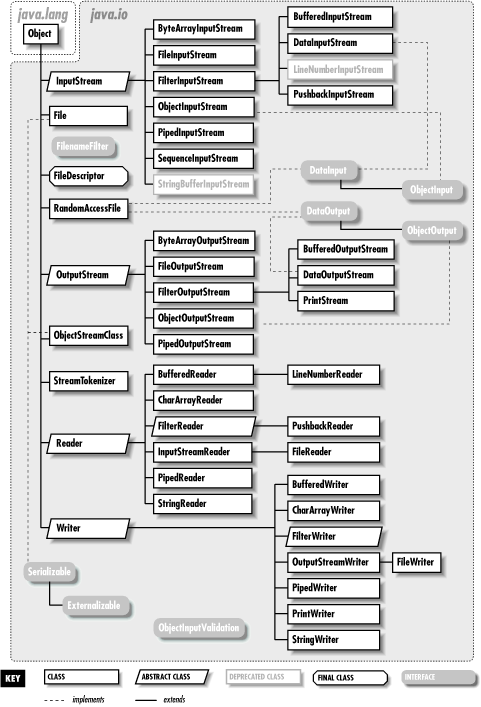
Überblick
| Lesen | Schreiben | |
|---|---|---|
| bytes | %InputStream |
%OutputStream |
| chars | %Reader |
%Writer |
| Files | Files. |
Files. |
Bytestreams
public abstract class OutputStream implements Closeable, Flushable {

    public abstract void write(int b)   // schreibt NIEDRIGSTES Byte von b
    public void write(byte b[])
    ...
}
public abstract class InputStream implements Closeable {
public abstract int read() // liest EIN Byte, returnt [0, 255]
public int read(byte b[]) // returnt Anzahl an gelesenen Byte
public byte[] readNBytes(int len)
public byte[] readAllBytes()
...
}- Implementiertung für diverse IO-Devices
- 👎 mühsam 👎
DataOutput
public interface DataOutput {

    void writeBoolean(boolean v) throws IOException;
    void writeByte(int v) throws IOException;
    void writeShort(int v) throws IOException;
    void writeChar(int v) throws IOException;
    void writeInt(int v) throws IOException;
    void writeLong(long v) throws IOException;
    void writeFloat(float v) throws IOException;
    void writeDouble(double v) throws IOException;
    void writeBytes(String s) throws IOException;   // ⚠️ nur ASCII ⚠️
    void writeChars(String s) throws IOException;   // wieviele bytes?
    void writeUTF(String s) throws IOException;     // 2B length, data
}
DataInput
public interface DataInput {

    int skipBytes(int n) throws IOException;  // returnt wieviele geskippt
    boolean readBoolean() throws IOException;
    byte readByte() throws IOException;
    int readUnsignedByte() throws IOException;
    short readShort() throws IOException;
    int readUnsignedShort() throws IOException;
    char readChar() throws IOException;
    int readInt() throws IOException;
    long readLong() throws IOException;
    float readFloat() throws IOException;
    double readDouble() throws IOException;
    String readLine() throws IOException;   // ⚠️ nur ASCII ⚠️
    String readUTF() throws IOException;
}
werfen EOFException bei unerwartetem Dateiende
RandomAccessFile
public class RandomAccessFile
        implements DataOutput, DataInput, Closeable {

    public RandomAccessFile(String name, String mode)
    public native long length()
    public native long getFilePointer()
    public void seek(long pos)
    public native void setLength(long newLength)
}- implementiert
DataInputundDataOutput - sehr mächtig
void seek(long pos)- Filepointer wird auf Position
posgesetzt void setLength(long newLength)- schneidet die Datei einfach ab
try (RandomAccessFile file = new RandomAccessFile("test.dat", "rw")) {
    file.write(-1);      // 1 Byte
    file.writeInt(42);    // 4 Byte
    file.writeUTF("Godzilla");
    file.writeUTF("ゴジラ");
    file.seek(5);
    String s = file.readUTF();
}
FF 00 00 00 2A 00 08 47 6F 64 7A 69 6C 6C 61 00
09 E3 82 B4 E3 82 B8 E3 83 A9DataOutputStream/DataInputStream
public class FilterOutputStream extends OutputStream {

    protected OutputStream out;
    ...
}
public class DataOutputStream extends FilterOutputStream
implements DataOutput {
public DataOutputStream(OutputStream out) {
super(out);
}
...
}new DataInputStream(
new BufferedInputStream(
new FileInputStream(FILENAME)));
byte[] data;
try (ByteArrayOutputStream baos = new ByteArrayOutputStream();
     DataOutputStream output = new DataOutputStream(baos)) {
    output.writeInt(42);
    output.write(256);
    output.writeUTF("string");
    data = baos.toByteArray();
}
try (DataInputStream input = new DataInputStream(
        new ByteArrayInputStream(data))) {
    int i = input.readInt();
    int b = input.read();
    String string = input.readUTF();
}
Charstreams
public abstract class Writer implements Appendable, Closeable, Flushable {

    public void write(int c)    // schreibt einen char
    public void write(String str)
    public Writer append(char c)
    public Writer append(CharSequence csq)
    ...
}
public abstract class Reader implements Readable, Closeable {
public int read() // liest einen char
public long skip(long n)
public int read(char[] cbuf)
...
}- Implementiertung für diverse IO-Devices
- 👎 mühsam 👎
PrintWriter/BufferedWriter
public class PrintWriter extends Writer {

    protected Writer out;

    public void print(...)
    public void println(...)
    ...
}- bekannt von
System.out - unabhängig vom line ending
- am besten um einen
BufferedWriterwrappen, um die Performance zu erhöhen
new PrintWriter(new BufferedWriter(new CharArrayWriter()))BufferedReader
public class BufferedReader extends Reader {

    private Reader in;

    public String readLine() // -> null bei EOF
    ...
}
zeilenweises Lesen unabhängig vom line ending
byte[] data;
try (ByteArrayOutputStream baos = new ByteArrayOutputStream();
     PrintWriter writer = new PrintWriter(
             new BufferedWriter(new OutputStreamWriter(baos)))) {
    writer.println(42);
    writer.println("Hello World");
    writer.printf("%.3f", Math.PI);
    writer.flush();     // stream wird beim closen geflushed
    data = baos.toByteArray();
}
try (BufferedReader reader = new BufferedReader(
        new InputStreamReader(new ByteArrayInputStream(data)))) {
    String line;
    while ((line = reader.readLine()) != null) {
        ...
    }
}
Best practice
- try-with verwenden
- buffern
available()ready()- zur EOS-Bestimmung Exceptions catchen
- beim Lesen/Schreiben von Dateien
Files-Methoden verwenden