
Features
- Erstrelease 1995
- angelehnt an C/C++
- objektorientiert
- interpretiert
- statisch typisiert
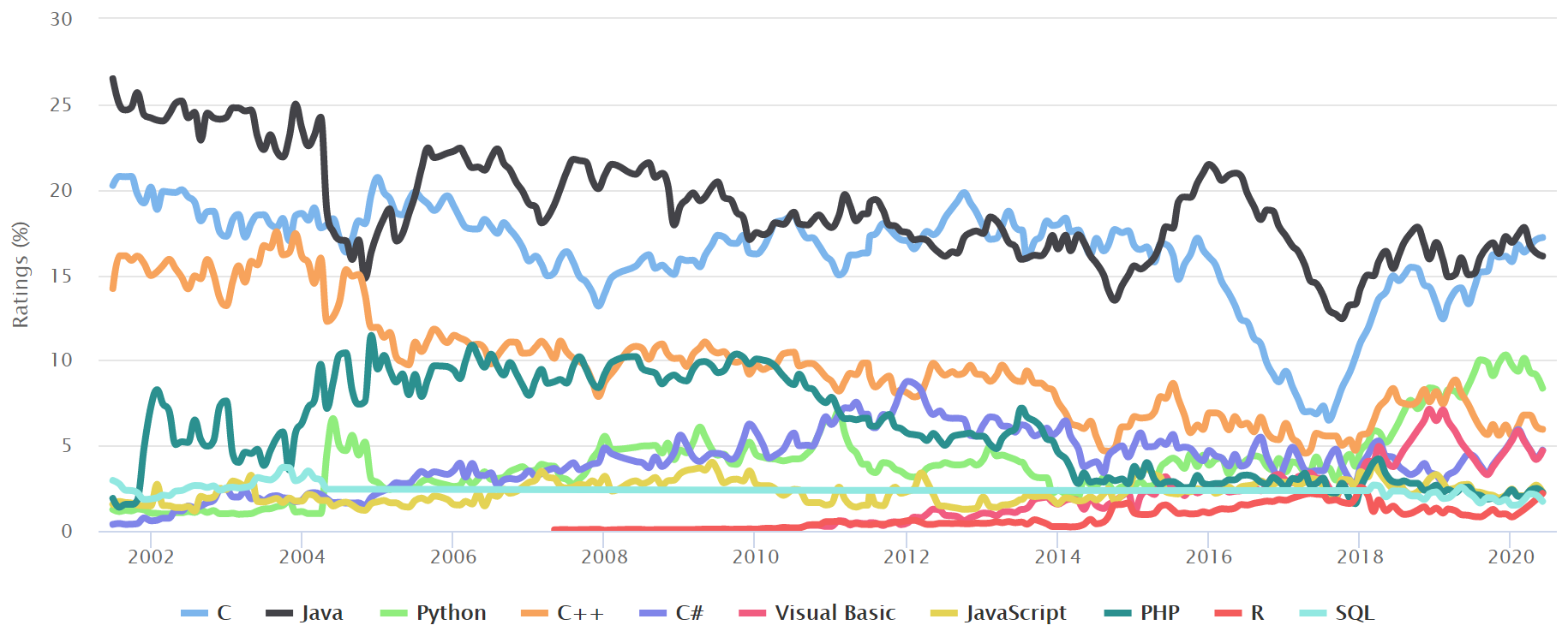
Interpretiert?
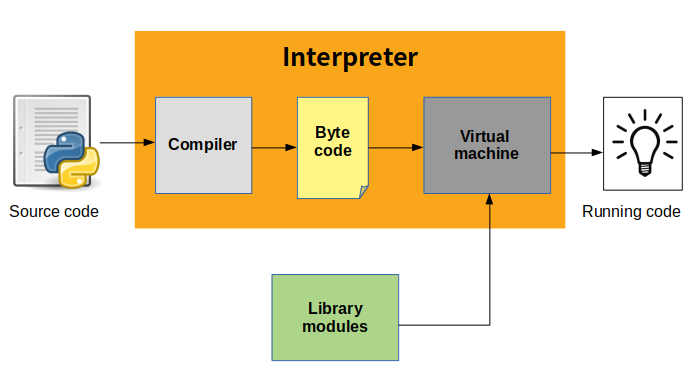
Compilation bei Bedarf
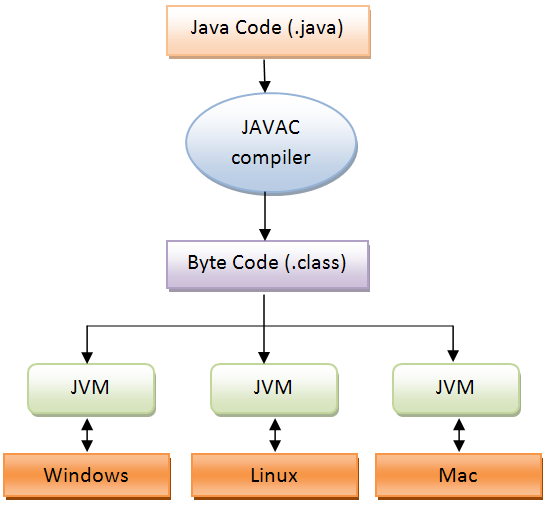
Details
def sum(a, b):
    return a + b
2 0 LOAD_FAST 0 (a)
2 LOAD_FAST 1 (b)
4 BINARY_ADD
6 RETURN_VALUE111000100110100011010001101101111110110000001001011011000011011011
010011001000010001011000011011000011100011101101010110101011000101
100100000101101000100111100000101101101111011011000000101001111100 Statisch typisiert
byte b = 127;
short countries = 195;
int austrians = 8902600;
long population = 7_793_010_144L;
float average = 2.573F;
double gravity = 9.80665;
boolean typed = true;
char character = 'a';
String name = "Java";| Typ | Byte | Min | Max |
|---|---|---|---|
byte |
1 | -128 | 127 |
short |
2 | -32 768 | 32 767 |
int |
4 | -2 147 483 648 | 2 147 483 647 |
long |
8 | -2⁶³ | 2⁶³-1 |
| Typ | Byte | Stellen exakt |
|---|---|---|
float |
4 | ~7 |
double |
8 | ~16 |
Two's Complement
5 = 0101
-5?
~5 -> 1010
     +   1
      ----
      1011 = -5
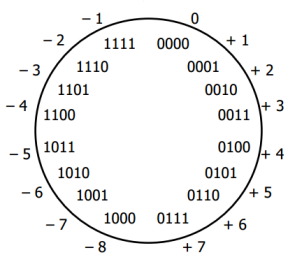
Overflow
int max = 2_147_483_647;
System.out.println(max + 1);-2147483648double max = 1.7976931348623157E308;
System.out.println(2 * max);InfinitySyntax
- Anweisungen werden mit
;abgeschlossendoThis(); - Blöcke werden durch
{ }gekennzeichnetpublic static void main(String[] args) { System.out.println("Hello World"); }
Hello World
myFile.py
if __name__ == '__main__':
print('Hello World')python myFile.py
Hello Worldpublic class HelloWorld {
public static void main(String[] args) {
    System.out.println("Hello World");
}
} javac HelloWorld.java
java HelloWorld
Hello WorldVariablen
🐍
number_of_students = 25
number_of_students = 24
Typ nameOfTheVariable;
int numberOfStudents = 25;
int numberOfStudents = 24; // 🚫 Typ nur bei Deklaration
numberOfStudents = 24;
double uninitialised;Operationen
🐍
3 + 'Python' -> 💥
3 + "Java" -> "3Java"
String + ??? = String
3 + 2 + "!" -> "5!"
Arithmetik
🐍
8 / 3 = 2.6666666666666665
8 / 3 = 2int / int = intint n = 2;
System.out.println(++n); // n += 1, dann Ausgabe
System.out.println(n++); // Ausgabe, dann n =+ 1
System.out.println(n);3
3
4if
if (grade == 1) {
    System.out.println("Sehr gut");
}
if (i % 2 == 0) {
System.out.println("Gerade");
} else {
System.out.println("Ungerade");
}if (condition) {
// true
} else {
// false
}if (condition) {
// true
} else if (otherCondition) {
// condition false, otherCondition true
} else {
// condition false, otherCondition false
}and/or/not
🐍
if month == 2 and day == 30 or month > 12:
    raise ValueError('Illegal date')
if (month == 2 && day == 30 || month > 12) {
throw new IllegalArgumentException("Illegal date");
}🐍
not(7 / 2 == 3)!(7 / 2 == 3)switch/case
🐍
if grade == 'Sehr gut':
    result = 1
elif grade == 'Gut':
    result = 2
...
else:
    raise ValueError('Invalid grade: ' + grade)
int result = switch (grade) {
case "Sehr gut", "sehr gut" -> 1;
case "Gut" -> 2;
...
default ->
throw new IllegalArgumentException("Invalid grade: " + grade);
};for
for (int i = 0; i < 3; i++) {
    System.out.println(i);
}
0
1
2for (int i = 0; i < 4; i+=2) {
System.out.println(i);
}0
2for (init; condition; update) {
// code
}init;
if (condition) {
// code
}
update;
if (condition) {
// code
}
update;
if (condition) {
// code
}
...while, break, continue -> wie in PythonStrings
char oneCharacter = 'c';
String text = "Hello World";
String number = "42";
🐍
as_int = int(number)int asInt = Integer.parseInt(number);Stringformatierung
🐍
pi = 3.1415926
print(f'pi = {pi:06.2f}')
pi = 003.14double pi = 3.1415926;
System.out.printf("pi = %06.2f", pi);
String asString = String.format("pi = %06.2f", pi);Einlesen
🐍
input_string = input('Age: ')
age = int(input_string)
Scanner scanner = new Scanner(System.in);
System.out.println("Age: ");
int age = scanner.nextInt();Manipulieren
🐍
len('String') -> 6
"String".length() -> 6
🐍
'String'[1] -> 't'
"String".charAt(1) -> 't'
🐍
'String'[2:5] -> 'rin'
"String".substring(2,5) -> "rin"
🐍
'Seperated by delimiter'.split(' ')
    -> ['Seperated', 'by', 'delimiter']
"Seperated#by#delimiter".split("#")
-> ["Seperated", "by", "delimiter"]try / catch / throw
🐍
age = input('Age: ')
try:
    age = int(age)
except ValueError as error:
    print('Illegal age: ' + age)
String input = scanner.nextLine();
int age = 0;
try {
age = Integer.parseInt(input);
} catch (NumberFormatException e) {
System.out.println("Illegal age: " + input);
}🐍
raise ValueError('Error accessing ' + database)throw new IllegalArgumentException('Error accessing ' + database)Arrays
- Syntax ähnlich Python
- Definierte Länge
- Typisiert
- Hilfsmethoden unter
Arrays.verfügbar
🐍
list = [42]
list.append(3)
print(list[1]) -> 3
🐍
list = [42, 'nein', list]
int[] array = new int[3];
System.out.println(array) -> [I@6acbcfc0
System.out.println(Arrays.toString(array)) -> [0, 0, 0]
array[0] = 42;
Mehr Dimensionen
int[][] matrix = new int[3][2];
for (int row = 0; row < matrix.length; row++) {
    for (int col = 0; col < matrix[row].length; col++) {
        matrix[row][col] = 10 * row + col;
    }
}| col | ||
|---|---|---|
| row | 0 | 1 |
| 0 | 0 | 1 |
| 1 | 10 | 11 |
| 2 | 20 | 21 |
for-in
🐍
for item in list:
    print(item)
for (int i = 0; i < array.length; i++) {
int item = array[i];
System.out.println(item);
}for (int item : array) {
System.out.println(item);
}Methoden/Routinen/Funktionen
🐍
def foo(number: int) -> float:
    """Takes an integer, returns a float"""
    return 'Hello World'

foo('42')
/**
* Takes an integer, returns a double
*/
double foo(int number) {
    return "Hello World"; 🚫
}
double foo(int number) {
    return 1.0;
}
foo("42"); 🚫
void methodReturnsNothing(String s) {
    System.out.println(s);
}
Command Line Arguments
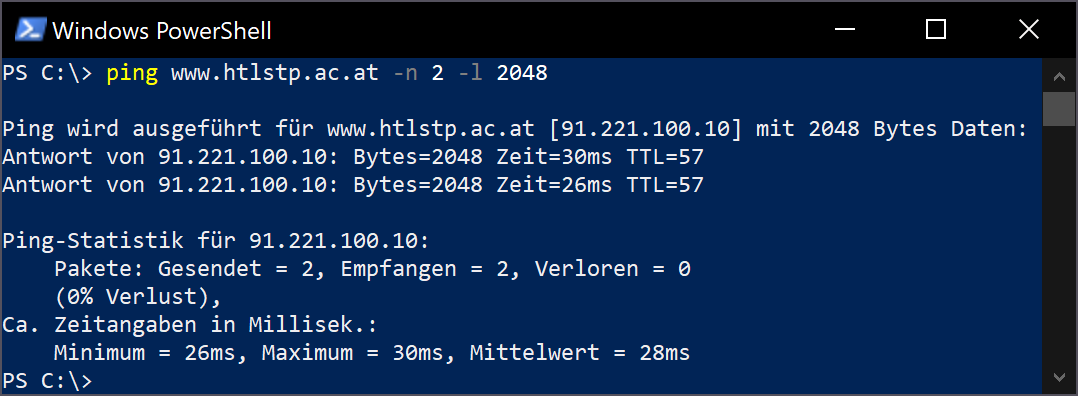
Vorteile gegenüber GUIs:
- automatisierbar
- weniger Aufwand
☕
public class CLI {

    public static void main(String[] args) {
        System.out.println(Arrays.toString(args));
    }
}
java CLI These are command line arguments[These, are, command, line, arguments]🐍
import sys

if __name__ == '__main__':
    print(sys.argv)
python CLI These are command line arguments['cli.py', 'These', 'are', 'command', 'line', 'arguments']