JavaFX
JavaFX
- Java Platform zur Erstellung Graphischer Applikationen
- nicht in Java SE enthalten
-
Nachfolger von AWT und Swing
⚠️viele Klassen in mehreren Frameworks
Beim Importieren aufpassen!
import java.awt.Button;
import javafx.scene.control.Button;
Maven
- Verwaltet Sourcecode
- Struktur

- ProjectObjectModel
<project xmlns="namespace"
         xmlns:xsi="schemaInstance"
         xsi:schemaLocation="schemaURL">
    <groupId>at.htlstp</groupId>
    <artifactId>MavenProject</artifactId>
    <version>1.0-SNAPSHOT</version>

    <properties>
        <project.build.sourceEncoding>UTF-8</project.build.sourceEncoding>
        <javaFxVersion>15.0.1</javaFxVersion>
        <maven.compiler.release>15</maven.compiler.release>
    </properties>

    <dependencies>
        <!-- download -->
    </dependencies>
</project><dependencies>
<dependency>
<groupId>org.openjfx</groupId>
<artifactId>javafx-base</artifactId>
<version>15.0.1</version>
</dependency>
<dependency>
<groupId>org.openjfx</groupId>
<artifactId>javafx-controls</artifactId>
<version>${javaFxVersion}</version>
</dependency>
<dependency>
<groupId>org.openjfx</groupId>
<artifactId>javafx-graphics</artifactId>
<version>${javaFxVersion}</version>
</dependency>
<dependency>
<groupId>org.openjfx</groupId>
<artifactId>javafx-fxml</artifactId>
<version>${javaFxVersion}</version>
</dependency>
</dependencies>Resources
Files in resources werden in das kompilierte Programm aufgenommen
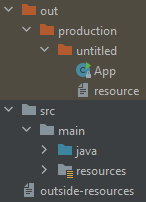
- resources
- Daten, die zum Compilezeitpunkt fix sind, z.B.:
- Graphiken
- Sounds
- Layoutinformation
- nicht resources
- Daten, die der User bearbeiten möchte
- Daten, die erst zur Laufzeit benötigt werden
- Input
- custom Data(Mods)
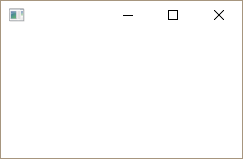
White Screen
public class WhiteStage extends Application {
    @Override
    public void start(Stage primaryStage) throws Exception {
        primaryStage.show();
    }
}
public class Launcher {
public static void main(String[] args) {
Application.launch(WhiteStage.class, args);
}
}
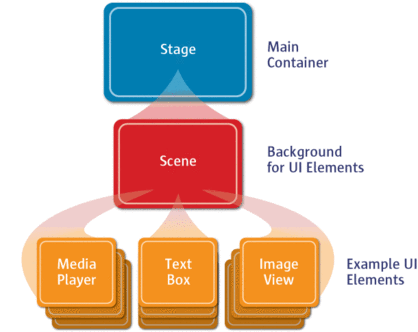
Hierarchie
FXML
public class FxmlApplication extends Application {

    @Override
    public void start(Stage primaryStage) throws Exception {
        URL resource = getClass().getResource("/layout/gui.fxml");
        Parent root = FXMLLoader.load(resource);
        Scene scene = new Scene(root);
        primaryStage.setScene(scene);
        primaryStage.show();
    }
}<AnchorPane fx:controller="fxml.Controller" ... />public class Controller implements Initializable {
@Override
public void initialize(URL location, ResourceBundle resources) {
// GUI ready
}
}Event
- Ausgelöst durch Interaktion mit GUI
- durch
element.setOnXXXwird ein Handler definiert
button.setOnAction(new EventHandler<ActionEvent>() {
    @Override
    public void handle(ActionEvent event) {
        System.out.println(event.getSource() + "clicked");
    }
});
textField.setOnAction(ev -> label.setText(textField.getText()));checkBox.setOnAction(ev -> handleCheckBoxAction());Alert
Alert alert = new Alert(Alert.AlertType.ERROR);
alert.setTitle("Error");
alert.setHeaderText("Huge mistake");
alert.setContentText("You have no idea what's going on");
alert.showAndWait();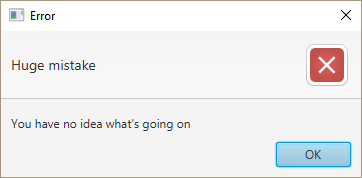
Observable
- Elemente haben Properties, deren Änderung in einem Listener eine Aktion auslösen
InvalidationListenertfSlider.textProperty() .addListener(observable -> txtSlider.setText(tfSlider.getText()));ChangeListenertfSlider.textProperty() .addListener((observable, oldValue, newValue) -> txtSlider.setText(newValue));- Binding
txtSlider.textProperty().bind(tfSlider.textProperty());
Binding
subscriber.bind(publisher)-
publisher = x->subscriber = xsubscriber = x->Exception💥
txtSlider.textProperty().bind(tfSlider.textProperty());button.disableProperty().bind(cbDisabled.selectedProperty());slider.valueProperty().bind(textField.textProperty()); 🚫txtFahrenheit.textProperty().bind(
sliderCelsius.valueProperty() // DoubleProperty
.multiply(9.0 / 5).add(32).asString()
);a.bindBidirectional(b);
a.bindBidirectional(c);Converter
tfSlider.textProperty().bindBidirectional(
        slider.valueProperty(), new StringConverter<Number>() {
    @Override
    public String toString(Number number) {
        return String.format("%.0f", number.doubleValue());
    }

    @Override
    public Number fromString(String string) {
        try {
            return Integer.parseInt(string);
        } catch (NumberFormatException ex) {
            alert.showAndWait();
            return 0;
        }
    }
});
Multiple Dependencies
Problem: x updaten, wenn sich a, b oder c updaten
a.addListener(value -> updateX());
b.addListener(value -> updateX());
c.addListener(value -> updateX());
...

private void updateX() {
    x.setValue(calcX());    // greift auf a,b,c zu
}
StringBinding binding = Bindings.createStringBinding(
() -> calcX(), // X getX
a, b, c);
x.bind(binding);ListView
.getItems().getSelectionModel()
listView.getItems().add(toAdd);
listView.getSelectionModel().selectFirst();
Custom ListView
ListView<X>ruft item.toString() auf
lvX.setCellFactory(lv -> new XListCell());public class XListCell extends ListCell<X> {
@Override
protected void updateItem(X item, boolean empty) {
super.updateItem(item, empty);
if (empty || item == null) {
setGraphic(null);
setText(null);
} else
setText(item.toString());
}
}public class CustomListCell extends ListCell<CustomClass> {
@FXML
private Label label;
private FXMLLoader loader;
@Override
protected void updateItem(CustomClass item, boolean empty) {
super.updateItem(item, empty);
setText(null);
if (empty || item == null)
setGraphic(null);
else {
boolean fxmlLoaded = loader != null;
if (!fxmlLoaded) {
loader = new FXMLLoader(getClass().getResource(FXML));
loader.setController(this);
loader.load();
}
setupGui(item); // label.setText(item.name())...
setGraphic(loader.getRoot());
}
}