JDBC
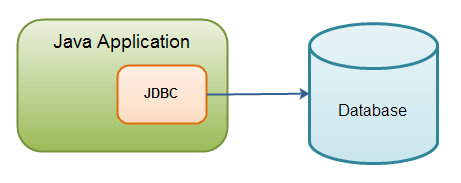
Architektur
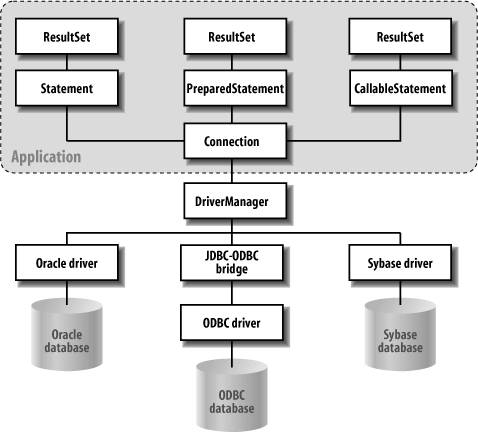
Ablauf
DriverManagererzeugtConnectionConnectionerzeugtStatementStatementwird auf Db executed- Db returnt
ResultSet ResultSetverarbeitenStatementclosenConnectionclosen
getConnection
var connection = DriverManager.getConnection("jdbc:h2:mem:");var connection = DriverManager.getConnection(
"jdbc:postgresql://ifpostgres02:5432/db",
"unterricht",
"unterricht");var properties = new Properties();
properties.put("user", "scre");
properties.put("password", "secure");
var connection = DriverManager.getConnection(
"jdbc:mysql://host/db",
properties);var dataSource = new JdbcDataSource();
dataSource.setURL("jdbc:...");
return dataSource.getConnection("user", "pw");CI: Secret-Manager setzt während Build Daten
Connection
public interface Connection  extends Wrapper, AutoCloseable {

    // allgemeine Infos
    DatabaseMetaData getMetaData() throws SQLException;

    // Kommunikation mit Db
    Statement createStatement() throws SQLException;
    PreparedStatement prepareStatement(String sql) throws SQLException;
    CallableStatement prepareCall(String sql) throws SQLException;

    // Transaktionsmanagement
    void setAutoCommit(boolean autoCommit) throws SQLException;
    void commit() throws SQLException;
    void rollback() throws SQLException;
    Savepoint setSavepoint() throws SQLException;
    void rollback(Savepoint savepoint) throws SQLException;

    ...
}Statement
public interface Statement extends Wrapper, AutoCloseable {

    ResultSet executeQuery(String sql) throws SQLException; // SELECT
    int executeUpdate(String sql) throws SQLException;
         // INSERT, UPDATE, DELETE, DDL
    ...
try (var connection = DriverManager.getConnection("jdbc:h2:mem:")) {
var statement = connection.createStatement();
statement.executeUpdate("""
CREATE TABLE students(
id INTEGER,
first_name VARCHAR(50) NOT NULL,
constraint students_pk
primary key (id));
""");
}Problem
public Stream<String> getStudentNamesLikeName(String name)
        throws SQLException {
    try (var statement = connection.createStatement()) {
        var resultSet = statement.executeQuery("""
                SELECT first_name
                FROM students
                WHERE first_name LIKE '%%%s%%'"""
                .formatted(name));
        var builder = Stream.<String>builder();
        while (resultSet.next())
            builder.accept(resultSet.getString("first_name"));
        return builder.build();
    }
}getStudentIdsWhereStudentsLikeName("fred") => [Alfred, Manfred]getStudentNamesLikeName("' OR '1'='1") => [Alfred, Bob, Carl, ...]⚠️ Statement nur ohne Parameter! ⚠️
PreparedStatement
Besser als Statement
- bereits vorkompiliert auf Db ⟹ effizienter
- Parameter übergeben
var sql = "INSERT INTO students (id, first_name) VALUES (?, ?)";
try (var statement = connection.prepareStatement(sql)) {
    statement.setInt(1, student.getId());
    statement.setString(2, student.getName());
    statement.executeUpdate();
}- SQL Parameter als
? - Setzen durch
setXXX() - kein
' 'bei Strings notwendig
ResultSet
- wird von
statement.executeQueryreturnt - ähnlich
IteratorBewegen eines Cursors - Cursor zu Beginn vor erstem Record
- wird mit dem
Statementgeschlossen
Methoden
boolean next()- Cursor weiterbewegen
false⟹ kein Record mehrXxx getXxx(String columnLabel)- liest Information aus aktuellem Record
boolean wasNull()- nach
getXxxzu callen true⟹ NULL in Db
int n = resultSet.getInt("contains_nulls_and_0s");
// n = 0 entweder weil Column 0 oder NULL
if (resultSet.wasNull())
    ...
public Stream<Student> findAll() throws SQLException {
        var sql = """
                SELECT id, first_name
                FROM students
                """;
    try (var statement = connection.prepareStatement(sql)) {
        var resultSet = statement.executeQuery();
        var builder = Stream.<Student>builder();
        while (resultSet.next()) {
            var id = resultSet.getInt("id");
            var firstName = resultSet.getString("first_name");
            builder.add(new Student(id, firstName));
        }
        return builder.build();
    }
}NULL
public class Student {

    private int id;
    private String firstName;
    private Boolean mayContactParents; // true, false, null
public Stream<Student> findAllWithParentalPermission(Boolean permission)
throws SQLException {
var sql = """
SELECT id, first_name
FROM students
WHERE may_contact_parents = ?
""";
try (var statement = connection.prepareStatement(sql)) {
statement.setBoolean(1, permission);
...java.lang.NullPointerExceptionif (permission == null)
statement.setNull(1, Types.NULL); ==> leerer Stream😡 SQL 😡
= NULList immerfalseIS NULL🤔
public Stream<Student> findAllWithParentalPermission(Boolean permission)
        throws SQLException {
    var query = permission == null ? "IS NULL" : "= ?";
    var sql = """
            SELECT id, first_name
            FROM students
            WHERE may_contact_parents
            """ + query;
    try (var statement = connection.prepareStatement(sql)) {
        if (permission != null)
            statement.setBoolean(1, permission);
        var resultSet = statement.executeQuery();
        ...
auto_increment
public void save(User user) throws SQLException {
    var sql = """
            INSERT INTO users (login_name)
            VALUES (?)
            """;
    try (var statement = connection.prepareStatement(sql,
            Statement.RETURN_GENERATED_KEYS)) {
        statement.setString(1, user.getName());
        statement.executeUpdate();
        ResultSet generatedKeys = statement.getGeneratedKeys();
        if (generatedKeys.next())
            user.setId(generatedKeys.getLong(1));
        else
            throw new SQLException("Saving user failed.");
    }
}
Entities
public class Entity {

    private final Id id;    // Integer, Long, UID, String, ...
    private final Stuff stuff;

    @Override
    public boolean equals(Object o) {
        if (this == o) return true;
        if (o == null || getClass() != o.getClass()) return false;
        Entity other = (Entity) o;
        return id == null ? false : id.equals(other.id);
    }

    @Override
    public int hashCode() {
        return id == null ? 42 : id.hashCode();
    }

    public Optional<Id> getId() {
        return Optional.ofNullable(id);
    }
}
Transactions
ermöglicht Rollback von Änderungen
connection.setAutoCommit(false);
try {
    thisMightNotWork();
    maybeViolatesConstraints();
    connection.commit();
} catch (SQLException e) {
    connection.rollback();
} finally {
    connection.setAutoCommit(true);
}
ACID
Transaction, wenn
- Atomic Operation notwendig
- Consistency der Db fragwürdig
- Isolation(Concurrency) notwendig
- Durability(Katastrophen) notwendig
Savepoint
connection.setAutoCommit(false);
Savepoint savepoint = null;
try (var statement = connection.createStatement()) {
    savepoint = connection.setSavepoint();
    statement.executeUpdate(sql[0]);
    statement.executeUpdate(sql[1]);

    savepoint = connection.setSavepoint();
    statement.executeUpdate(sql[2]);
    connection.commit();
} catch (SQLException e) {
    connection.rollback(savepoint);
} finally {
    connection.setAutoCommit(true);
}
Batch processing
public void depositMoney(int amount, Account source, Account destination)
        throws SQLException {
    connection.setAutoCommit(false);
    var sql = """
            UPDATE accounts
            SET balance = balance + ?
            WHERE account_num = ? """;
    try (var statement = connection.prepareStatement(sql)) {
        statement.setInt(1, amount);
        statement.setInt(2, destination.getNumber());
        statement.addBatch();
        statement.setInt(1, -amount);
        statement.setInt(2, source.getNumber());
        statement.addBatch();
        int[] result = statement.executeBatch();    // [updateCounts]
        connection.commit();
    } catch (SQLException e) {
        connection.rollback();
    } finally {
        connection.setAutoCommit(true);
    }
}